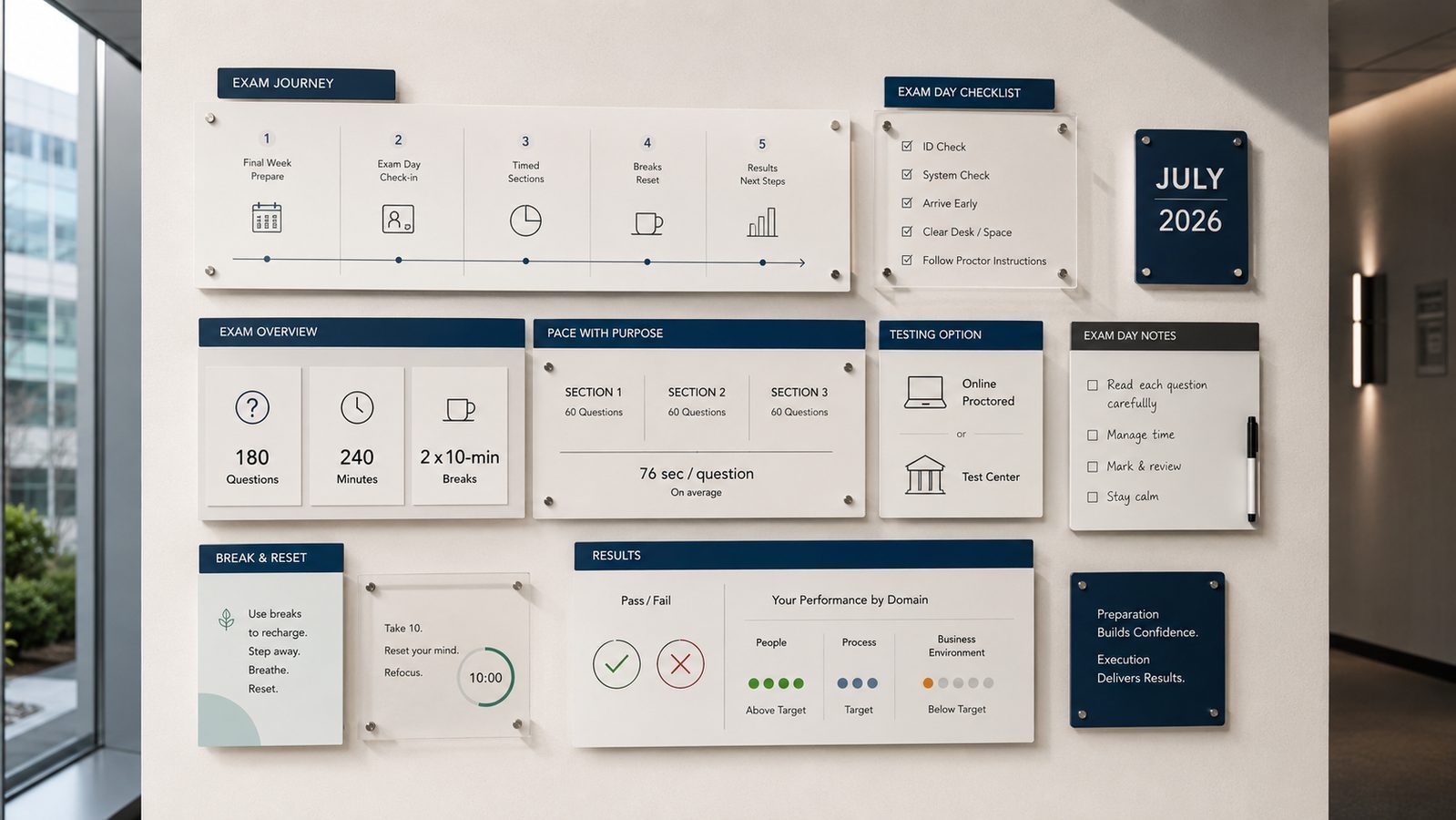
The PMP exam is not just a knowledge test. It is also an endurance test, a time-management test, and for many candidates, a stress-management test. By the final week before your PMP exam, the goal is no longer to learn new concepts; it is to arrive on test day calm, focused, and operationally prepared.
Whether you are taking the PMP exam at a Pearson VUE test center or through the online proctored format, small mistakes on exam day can hurt performance more than weak content knowledge. Candidates lose time because they arrive late, skip breaks, rush difficult questions, or underestimate how mentally demanding a 240-minute PMP exam really is.
This PMP Exam Day Guide for 2026 covers what to do during the final week before the exam, what to bring to the PMP test center, how online PMP proctoring works, pacing strategies during the exam, and what happens after you submit your results.
The Week Before Your PMP Exam Day
The week before is not for new content. Anything you have not learned by now will not stick before test day. The week is for consolidation, full-length practice, and logistics.
Take one full-length, 180-question timed practice exam under realistic conditions early in the week. Use a quiet room, the same two 10-minute breaks the real exam uses, and a timer. The goal is not the score; it is calibrating your pacing and your stamina across the full 240 minutes.
Review your weakest domain twice during the week. By now you know which domain drags your scores. Spend two focused sessions on it, working through questions and reading explanations.
Confirm logistics early. If you are testing at a center, drive the route once at the same time of day you will travel on exam day. Confirm the test center address, parking, and check-in time. If you are testing online, run the system check on the same machine and network you will use, clear your desk, and verify your government ID name matches your PMI profile name exactly. Name mismatches are one of the most common reasons candidates lose their appointment at check-in.
Stop studying 24 to 48 hours before the exam. The last day is for rest, not last-minute cramming. Cramming reduces retention and increases anxiety.
The Day Before Your PMP Exam
The day before is about energy and logistics, not content. In the morning, do a light review of your one-page summary notes for 60 to 90 minutes. After that, close the books. Reading more does not move the needle on test day.
Eat normal meals. Hydrate, but not excessively. Walk or exercise lightly to discharge nervous energy. Get to bed at your normal time, not earlier. Trying to sleep two hours early usually creates anxiety when you cannot fall asleep.
Pack your bag the night before. For an in-person exam you need a valid government-issued ID, your appointment confirmation email, and basic personal items. The test center provides everything else, including locked storage. For an online proctored exam, prepare a clear desk, a working webcam and microphone, and a stable internet connection. No second monitor, no phone within reach, no notes.
Set two alarms. Sleep.
At the Test Center or Online
Arrive 30 minutes early at a test center. The check-in process includes a photo, signature, biometric scan, and a security review of your pockets. Rushing through it raises your stress level for the first 20 questions, when you have the least margin for error.
For online proctored exams, log in 30 minutes early to allow time for the system check, room scan, and ID verification. The proctor will ask you to show your desk, the area under it, and a 360-degree view of the room. Anything that looks like a note will be questioned.
The exam itself is 180 questions over 240 minutes, broken into three roughly equal sections. After section one, you have a 10-minute break. After section two, you have another 10-minute break. Once you finish a section, you cannot return to it. You cannot bring scratch paper. The system provides a digital notepad and a calculator inside the testing interface.
If your test date is after July 9, 2026, you will sit the new exam format with rebalanced domain weightings and new question types. Our overview of the 2026 exam transition covers what to expect if you are sitting either version.
A specific note for online proctored exams. The proctor will challenge anything that looks like a note, a phone, or a second device. Smartwatches, earbuds, and even water bottles with labels can be flagged depending on the proctor. Clear all of them off your desk before the room scan. Lighting matters too. If your face is backlit or shadowed, the proctor may pause the exam to ask you to relight the room. Test all of this during the system check the day before, not 30 minutes before the exam starts. The candidates who lose time at online check-in usually skipped the system check or did it on a different machine than the one they ended up using.
During the PMP Exam: Pacing and Breaks
A workable pace is roughly 76 seconds per question, which gives you a small buffer at the end of each section. If you find yourself spending more than 90 seconds on a single question, mark it for review and move on. Three minutes on one question is a budget mistake you cannot recover.
Flag any question you are unsure of, but do not over-flag. If you flag 50 questions, you will not have time to review them all during the section. Aim for 10 to 15 flags per section, focused on the ones where you eliminated two options but could not decide between the remaining two.
Use the breaks. Step away from the screen. Walk if you can. Drink water. Eat a small snack if you brought one for an in-person break. The breaks are recovery, not bonus study time. Do not try to think about the previous section. Reset.
If your energy crashes mid-exam, breathe. Four seconds in, six seconds out, four times. This drops heart rate quickly. Tension during the exam is the most common reason candidates misread questions, and misreading is the most common reason they pick wrong answers.
After the PMP Exam
The result appears on screen as soon as you submit. PMI does not give you a numeric score. You receive Pass or Fail, plus a performance rating per domain (Above Target, Target, Below Target, or Needs Improvement).
If you pass, your digital certificate appears in your PMI account within a few business days, followed by the certified PMP credential on your record. You can update LinkedIn the same day.
If you do not pass, the domain ratings tell you where to focus next. PMI allows you to retake the exam, with up to three attempts per one-year eligibility window. Schedule the retake far enough out to address the weak domains, not so far that you lose what you learned.
Either way, take a day off before you analyze what happened. The exam is taxing, and emotional decisions made within 24 hours of a major test are rarely the right ones. The candidates who handle a near-miss well usually wait until the second day before making any decision about timing, materials, or a retake.
For candidates wondering whether their practice scores actually predicted exam performance, our analysis of what practice exam scores really predict covers the patterns that correlate with passing.
Key Takeaways
- The week before is for consolidation, one full-length practice exam, and logistics. Not new content.
- Stop studying 24 to 48 hours before the exam. Use that time for rest.
- Arrive 30 minutes early at a test center, or log in 30 minutes early for online proctoring.
- Pace at roughly 75 seconds per question. Flag the uncertain ones and move on.
- Use the two 10-minute breaks for full recovery. It is not bonus study time.
- Results appear on screen as Pass or Fail with domain ratings. Wait at least 24 hours before deciding what to do next.
PMP Exam Day FAQ
Can you use scratch paper on the PMP exam?
No. PMP candidates receive a digital whiteboard/notepad inside the exam interface instead of physical scratch paper.
How early should you arrive for the PMP exam?
PMI and Pearson VUE recommend arriving at least 30 minutes early for in-person exams.
What happens if your internet disconnects during an online PMP exam?
The online proctoring system attempts to reconnect automatically. Extended disconnects may result in the exam being terminated and reviewed by Pearson VUE.
Can you leave the room during PMP exam breaks?
Yes, during scheduled 10-minute breaks only. Once a section is completed, you cannot return to previous questions.
Train Exam Day Conditions Before Test Day
Most candidates underestimate the gap between studying and testing. Working questions in 30-minute blocks at home is not the same as sitting for almost four hours under proctored conditions. The candidates who handle PMP exam day calmly are usually the ones who simulated it at least 3-5 times before. Read more about how to prepare to pass the PMP Exam.
The Exam Mode at our PMP Exam Simulator replicates the real PMP exam timing, the two 10-minute breaks, and the question mix you will face on test day. Practice Mode lets you target specific domains when you spot weak areas in your full-length scores. Start with our free 20-question demo.